Posts

Showing posts with the label Programming

Hello Word Laravel

Image
Oke guys, kemarin kita sudah meninstall laravel di macbook. Sekarang kita coba untuk perkenalan dengan laravel. Biasanya neh, kalau di buku-buku tutorial kalau pertama begini pasti nyebutnya "Hello Word". Mungkin bete juga kali yak kebanyakan cingcong. Okelah kalau begitu. Adapun langkah-langkahnya : 1.   Jalankan php artisannya. Di tutorial sebelumnya belum dijelasakan yak php artisan itu apa. Okelah   kalau begitu, mungkin mirip apache kali ya. Soalnya kalau kita jalankan php artisan tanpa apache masih bisa jalan euy. Adapun untuk menjalankan php artisan, ketik di bawah ini di dalam terminal : php artisan serve Jangan lupa yo, ip / url nya dicatat yang diblok biru. 2.  Setelah menjalankan php artisan, kemudian buka ip / url yang diblok biru di browser yang kamu suka. 3.  Karena tampilan tersebut default dari instalasi, sekarang kita mau ganti menjadi file hello word yang kayak di buku-buku tutorial. Yaitu masuk ke f...
Instalasi Laravel 5 di Mac OS X

Image
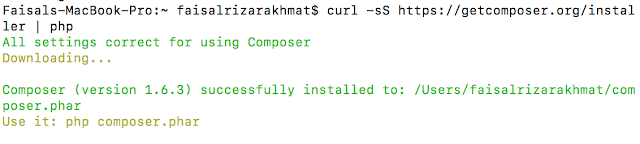
Okeh guys, gw sebenarnya baru neh colek-colek Laravel, gw biasa maen iOS, Android sama PHP native. Gw bingung juga neh mau mulai dari mana :(. Daripada kelamaan okelah langsung kita mulai saja kalau begitu: 1.   INSTAL COMPOSER Composer itu apa sih. Gw sendiri belum tahu guys. Di situs laravel sendiri itu menyebutkan seperti ini: "Composer is a tool for dependency management in PHP. It allows you to declare the libraries your project depends on and it will manage (install/update) them for you" Bahasa Inggris lagi tuh, mana gw kagak ngarti lagi. heheeh. Bercanda coy. Kalau menurut penterjemahan menurut gw, "Composer sebuah tool (alat) yang berkaitan dengan management PHP. Seperti perizinan untuk mendeklarasikan librari yang berkaitan / yang akan dipakai pada project / aplikasi kita, seperti mengatur install dan update librari tersebut". Maap neh ye, kalau ada kepleset terjemahannya. Adapun cara instalnya, pertama buka terminal, kemudian ketik seperti...

Visual Basic 6.0 Introduction

Image
1.1 The concept of computer programming Before we begin Visual Basic 6 programming, let us understand some basic concepts of programming. According to Webopedia, a computer program is an organized list of instructions that, when executed, causes the computer to behave in a predetermined manner. Without programs, computers are useless. Therefore, programming means designing or creating a set of instructions to ask the computer to carry out certain jobs which normally are very much faster than human beings can do. A lot of people think that computer CPU is a very intelligent thing, which in actual fact it is a dumb and inanimate object that can do nothing without human assistance. The microchips of  a CPU can only understand two distinct electrical states, namely, the on and off states, or 0 and 1 codes in the binary system. So, the CPU only understands a combinations of 0 and 1 codes, a language which we called machine language. Machine language is extremely difficult to learn a...

PHP Introduction

Image
Introduction Table of Contents What is PHP? What can PHP do? What is PHP? Getting Started Last updated: Fri, 03 Jun 2011     add a note User Contributed Notes   Introduction imajeffs at hotmail dot com   16-Nov-2009 01:11 Technically the web server always runs first. It doesn't understand PHP itself, but must be configured to detect whether the location requested by the client (browser) contains PHP segments or not. For example, any file with extension ".php" may be processed by invoking the PHP which interprets the PHP segments and feeds the entire HTML back to the server. It then returns that complete content back to the client. nostamar $AT$ g mail   30-Jan-2008 12:06 here is a "server-php >> html >> browser" process illustration: http://www.lastown.com/forum/viewtopic.php?t=533 it shows the basic steps; first php code is parsed at server into html; then sent to browser, that understands html tags and renders them to the display the webpage...

The Java Tutorial Introduction

Image
The Java Tutorials are practical guides for programmers who want to use the Java programming language to create applications. They include hundreds of complete, working examples, and dozens of lessons. Groups of related lessons are organized into "trails". For the most accurate and up-to-date tutorials, please access the latest version from Oracle's official website for the Java SE Tutorials (Last Updated  03/17/2011 ), which can be found at:  http://download.oracle.com/javase/tutorial . The Java SE Tutorials primarily describe features in Java SE 6. For best results,  download JDK 6 . What's New Enjoy quizzes? Take a minute to answer this quiz about Java applets.  The Java Tutorials are continuously updated to keep up with changes to the Java Platform and to incorporate feedback from our readers. Included in recent releases: The  JLayer  component, introduced in Java SE 7, is explained in  How to Decorate Components with JLayer . As of Java SE 7...